Quick to Unlock Screen0701
Publisher Description
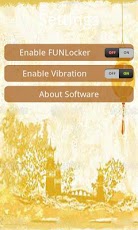
This is an unlock screen app;This is a quick unlocking screen tool, too.Do you want to have a try? Introductions:1. Offers you two shortcuts on the unlocking interface. You can just pull them down to make calls, or edit messages directly and quickly.2. Besides, you also can see a Chinese stamp on the unlocking screen. On the map, there are two red carps. In Chinese culture, red carps take annual and superabundant idea. And pull this stamp down, and you can turn your screen on quickly. Features:This is a quick unlocking tool. With it in hand, you can turn on your phone screen within a second.With the two shortcuts, you can quick start up your calling system and SMS function.So it will save you lots of time and trouble. Conclusion:Recent year, Chinese culture becomes more and more popular. So many people like going for Chinese elements.So we add some classic Chinese elements to this app. Hope that it can bring you both some convenience and culture connotation.Thanks for your supports! ******************************************************Note:When you download this free application, you will also download some ad-wares to your phone. These ad-wares will show you some notification ads or icon ads in this app.******************************************************
About Quick to Unlock Screen
The company that develops Quick to Unlock Screen is Control Power Home Tech Corp. The latest version released by its developer is 0701. This app was rated by 1 users of our site and has an average rating of 5.0.
To install Quick to Unlock Screen on your Android device, just click the green Continue To App button above to start the installation process. The app is listed on our website since 2013-04-18 and was downloaded 132 times. We have already checked if the download link is safe, however for your own protection we recommend that you scan the downloaded app with your antivirus. Your antivirus may detect the Quick to Unlock Screen as malware as malware if the download link to com.quick_to_unlock_screen_free_10416 is broken.
How to install Quick to Unlock Screen on your Android device:
- Click on the Continue To App button on our website. This will redirect you to Google Play.
- Once the Quick to Unlock Screen is shown in the Google Play listing of your Android device, you can start its download and installation. Tap on the Install button located below the search bar and to the right of the app icon.
- A pop-up window with the permissions required by Quick to Unlock Screen will be shown. Click on Accept to continue the process.
- Quick to Unlock Screen will be downloaded onto your device, displaying a progress. Once the download completes, the installation will start and you'll get a notification after the installation is finished.
Program Details
System requirements
Download information
Pricing
Version History
version 0701
posted on 2013-04-18
version 0701
posted on 2013-04-18
Several fixes and updates
